 Perfect Vox
Free vocal plugin for singers and rappers who record at home
A full studio vocal chain in one plugin. Dead easy to use.
VST3 and AU · Windows and Mac (Apple Silicon and Intel) · standalone app included · Pro Tools (AAX) coming soon
The problem
"It sounds like my bedroom. I can't let anyone hear it."
"Everyone else sounds pro. I don't."
"To get a decent vocal I have to pay a studio every time."
It's not your voice's fault. A radio-ready vocal goes through a processing chain that engineers spend years learning. When you record at home, this is what you face:
Compressor, EQ, de-esser, autotune, reverb, delay: to buy, chain in the right order and tweak one by one.
Mic too hot and your voice distorts. Too low and you hear hiss. And you only notice once the good take is gone.
Set the wrong key and autotune pulls you to the wrong notes. And finding the key of a beat isn't easy for everyone.
Tutorials that contradict each other, presets that only sound good on someone else's voice. Meanwhile, the inspiration fades.
The result? You spend more time fixing your vocal than singing.
Hear the difference
Real vocals recorded at home with a regular mic. Pick a genre and hear what changes.
Hit play and switch from BEFORE to AFTER while the vocal runs. Same take, same volume: only the sound changes.
The solution
The first time you pick I SING or I RAP and do a verse like in the real take. In a few seconds the plugin sets the input level by itself and, if you sing, finds the key too.
Pop, Soul, Rock or Rap: each genre has its own compression, color and autotune. Or start from one of the 41 presets.
COMP, EQ, DE-ESSER, VERB, DELAY, WIDE, FORCE. Clear names, each one does one thing, and you can't ruin the sound.

Perfect Vox detects it while you sing, or when you drag the beat file onto the plugin window. Autotune only corrects to the right notes.
And if your voice is already clipping in the audio interface, it tells you before you waste the take.
Dead easy to use
Pick what you want to get: the knob to turn lights up on the plugin.
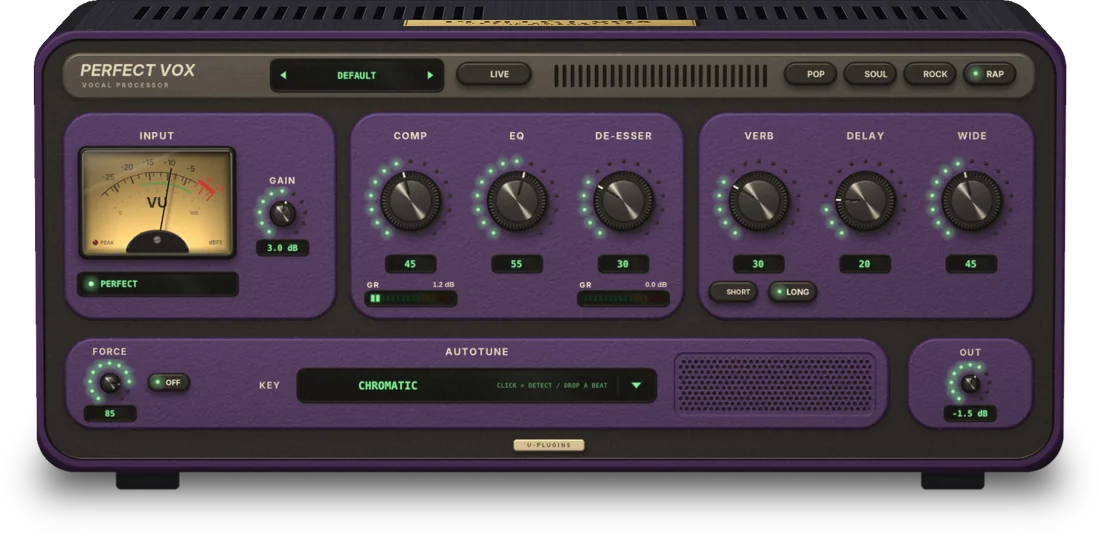
Turn up COMP. Your vocal stays upfront: quiet parts don't disappear and loud parts don't jump out.
Turn up EQ. More presence and air on top, less low-mid "mud". Like a vocal on a record.
Turn up DE-ESSER. It softens only those sharp sounds and leaves the rest of the vocal untouched.
Turn up VERB. SHORT is a small room, LONG a big hall. Already balanced so it never buries the vocal.
Turn up DELAY. The repeats lock to the tempo by themselves, bouncing left and right.
Turn up WIDE. The vocal opens up left and right while the center stays solid.
Turn FORCE. Low = natural correction, high = trap effect. It finds the key for you.
Turn OUT for the final volume. The input level sets itself in the first few seconds.
Why Perfect Vox
| Classic plugin chain | Perfect Vox | |
|---|---|---|
| Plugins to use | 5–7, to chain in the right order | 1, already wired and set up |
| Mic level | By ear, trial and error | Set automatically in a few seconds |
| Key for autotune | You need to know it | Finds it from your voice or the beat |
| Controls | Dozens of technical parameters | A few clearly named knobs |
| Singing in headphones with effects | Often too much delay | Low-latency LIVE mode |
| Price | Often hundreds of euros, adding up the plugins |

Who made it
Hi, I'm Andrea. I've been singing, producing and working as a recording engineer for over 10 years. I've seen hundreds of artists with beautiful ideas get lost in plugins, manuals and settings, and turn off the mic before recording the right take.
Perfect Vox is the vocal chain I use, packed into one plugin anyone can use. Every knob does what I do in the studio, so you can focus on singing.
— Andrea, U-Plugins
Launch
Use it in your songs. In return, tell me what you think: the first opinions shape the next versions.
Enter your name and email: the page with the Windows and Mac links opens right away.
FAQ
Yes, if your DAW loads VST3 plugins (Reaper, Ableton Live, FL Studio, Cubase, Studio One and others) or AU on Mac (Logic, GarageBand). If you don't have a DAW, there's the Perfect Vox app.
Yes, it's safe: it only contains the plugin and the app. Since it's a new program, Windows or macOS may show a warning the first time: the download page explains how to continue in two clicks.
Yes. In fact, it's made for people who record at home: the first few seconds set the right level for your mic and warn you if your audio interface is clipping.
No. Everything runs on your computer: no account, no subscription, no usage limits.
Perfect Vox is designed to be light. The best way to find out is to try it: it's free during launch.
Not yet: Pro Tools uses the AAX format, which is coming soon. Meanwhile you can use the Perfect Vox app or another DAW.
No. It sets the level and the key for you. You pick the genre and, if you like, turn a few knobs: each has a clear name and does one thing. Or just pick a preset.
Yes, with LIVE mode: latency drops to a minimum, even with autotune on.
Yes. On first launch pick I RAP: it only sets the level and keeps autotune off. The Rap genre has presets for rap and trap, with or without autotune: from boom bap to drill, ad-libs included.
No. After launch Perfect Vox will cost €49. Download it now, keep it for free and save €49.
Download Perfect Vox and hear the difference.
€49 €0 free during launch only